
MULT Espace
One EQ that sees every track at once.
Works on Windows and Mac. Supported by top DAWs such as Ableton, Pro Tools and Cubase.
- Every instance is linked. Whichever instance you have open, you can edit any track in the mix from there.
- Beyond the faster workflow, MULT Espace helps you turn a rough mix into a professional-sounding mix in far less time.
- You could call it... auto-mix. It's what you've been waiting for.
Modes
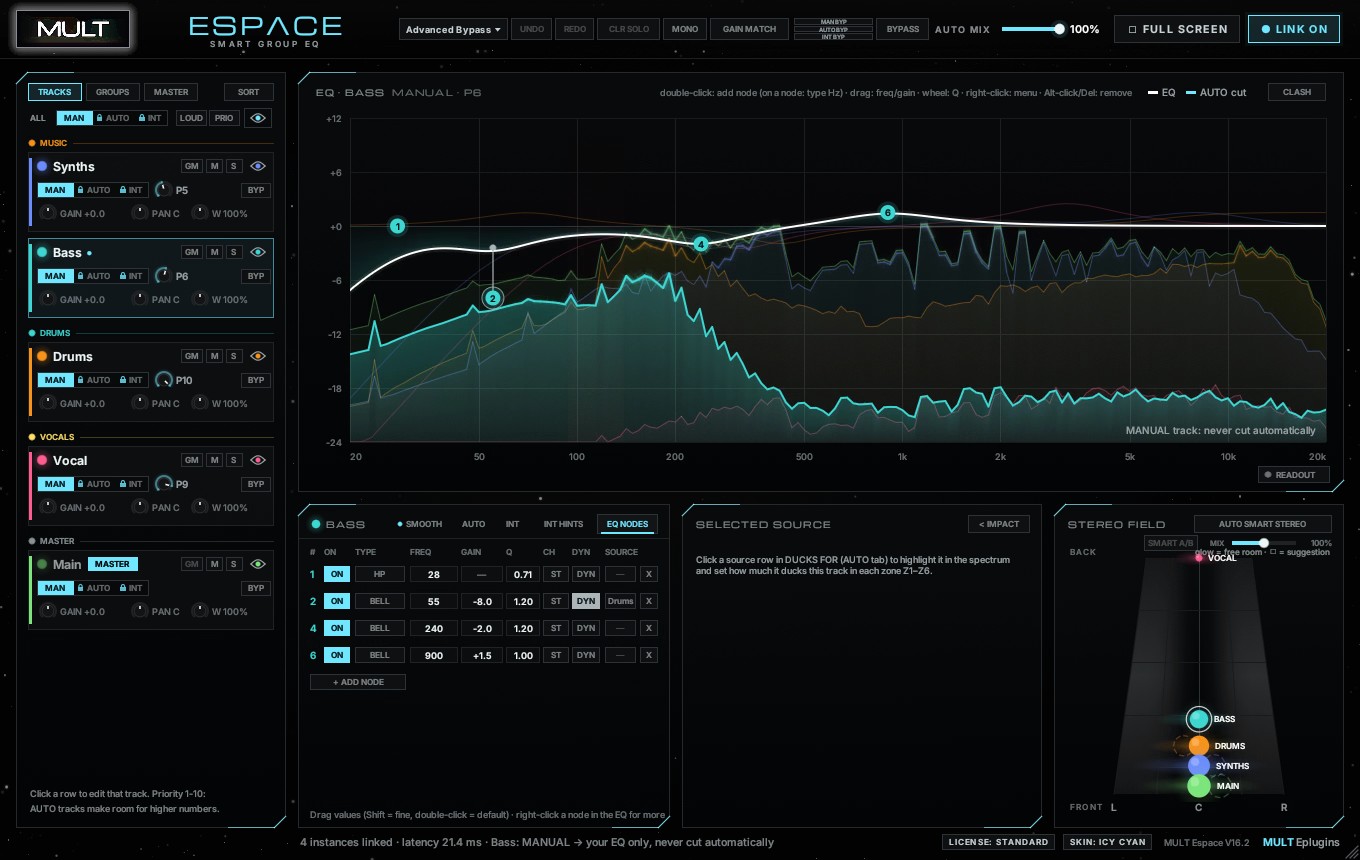
Full static and dynamic EQ, sidechain capability, stereo, mid or side modes, and solo node listening. A clear routing menu, DUCKS FOR, shows which frequencies are moving and for which source.
Automatic EQ balance and sidechaining. Give each track a priority from 1 to 10 and AUTO clears space around the more important parts, only where and when tracks clash. The DUCKS FOR menu shows what's moving, how much and where.
Smart stereo imaging included.
Intuitive listens to your music and to a reference track you choose, then applies corrective EQ, level, dynamics and tone, plus group glue and master finishing. Control how much with INT AMOUNT.
Mix modes freely. Every track and group has its own mode, and each mode remembers its own settings, so you can A/B/C your mix.
Features
See your mix
- Live frequency spectrums for every track
- CLASH view: red mono, blue stereo, purple both
- Hover fixes with TRY / KEEP / UNDO
- Stereo field map & IMPACT panel
- DAW tracks, track names and colors, with post FX, gain, pan and stereo width
EQ
- 8 nodes per track, Stereo/Mid/Side
- Dynamic EQ with sidechain capability within MULT Espace
- Solo listen per node
- Group and master EQ
- Smooth resonance suppressor (Auto and Intuitive)
Stereo
- AUTO SMART STEREO (AUTO and INTUITIVE)
- See the width and depth of all your tracks like a room, live
- Master stereo imager with vectorscope & correlation
- Per-track width and pan
Reference matching INTUITIVE · Coming soon
- Load a reference (wav, mp3, flac)
- Or pick a genre preset: House, Techno, DnB, Pop, Rock and more
- Reference Match EQ steers your tone, even at the group level
Workflow
- Choose MANUAL, AUTO or INTUITIVE mode
- Clean, organized layout for quick adjustments
- Understandable routing
Macro controls
- All bypass
- Sort priority
- Sort loudness
- Auto release all
- Mono stereo
System requirements
- Works on Windows and Mac
- Supported by top DAWs such as Ableton, Pro Tools and Cubase
- Windows 10/11, 64-bit, or macOS. VST3 host
- All linked instances must be in the same project
- Paid editions: a license key (emailed after purchase) to activate. The Free edition needs no key

Pricing
One plugin, four versions. Start with Free — sign up free, no license key needed — then upgrade when you want more. Paid editions are a one-time purchase in USD, no subscription.
Available now
- Up to 4 linked tracks in one group
- MANUAL mode with dynamic EQ
- No master link
- No license key needed
Available now
- Unlimited linked tracks
- Full manual control: every EQ function
- CLASH, dynamic EQ + sidechain, groups and extra skins
- Multi-track spectrum view: see and control every channel's EQ from any instance
Pay in Bitcoin, save 20%
Pay by card (Visa, Mastercard) at checkout, or with Bitcoin or USDT — email us for crypto
Email us to payAvailable now
- Everything in Manual
- SMOOTH resonance suppressor
- Automatic AUTO zones that find and carve frequency clashes between tracks
Upgrade from Manual: $40
Buy Auto: $79Coming soon — price TBD
- Everything in Auto
- INT mixes for you: auto balance and EQ
- Match EQ and genre references
Upgrade pricing will be set when Intuitive launches
Notify meSign up free to get the Free edition — no license key needed. Paid editions use the same plugin and the same key: when you upgrade, the new features just switch on. Nothing to reinstall. INTUITIVE arrives later as an upgrade. SMOOTH is in Auto and Intuitive only.
Get updates, mixing tips and launch deals
Every version includes the full MULT Espace user manual. Leave your email for launch deals, mixing tips and product news.
Buy Manual: $39Pay in Bitcoin, save 20%
Pay by card (Visa, Mastercard) at checkout, or with Bitcoin or USDT — email us for crypto
Email us to pay